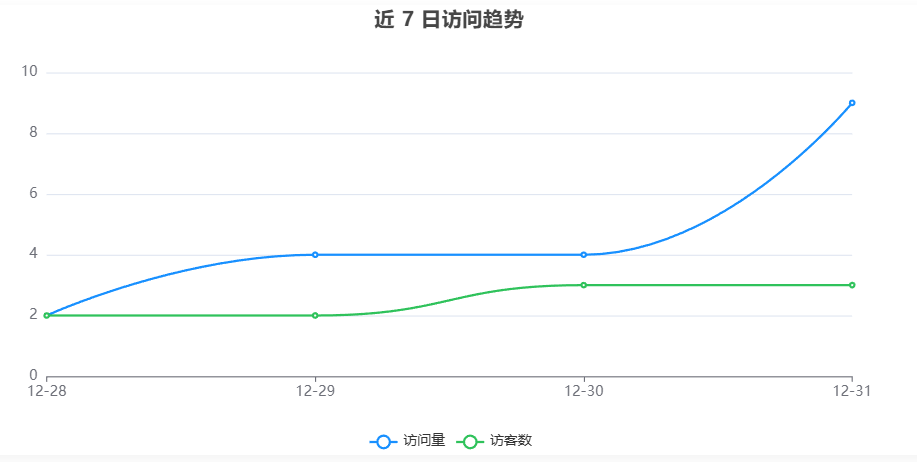
Fluid主题美化-访问量曲线图

我的Fluid博客是基于LeanCloud来统计访问量和访客的,但是LeanCloud的Counter记录的是pv和uv的总量,无法记录每一天的历史值,不方便展示曲线图。这个配置起来比较麻烦,本篇博客记录一下分享给大家。


具体展示效果参考统计数据

我们需要记录每一天的值,而LeanCloud的Counter记录的是历史总值,所以需要开一个定时任务,在每天的23:59分上报当前的pv和uv。

创建定时任务

  1. 登录LeanCloud,打开云引擎->管理部署页面
  2. 创建一个函数(如果没有分组,需要先创建分组)
  3. 点击部署tab下的在线编辑页面,把以下代码粘贴进去并部署到生产环境
1
2
3
4
5
6
7
8
9
10
11
12
13
14
15
16
17
18
19
20
21
22
23
24
25
26
27
28
29
30
31
32
33
34
35
36
37
38
39
40
41
42
43
44
45
46
47
48
49
50
51
console.log("--- 统计存档任务开始 ---");

// 1. 查询 Counter 表
const query = new AV.Query('Counter');
query.containedIn('target', ['site-pv', 'site-uv']);

try {
const results = await query.find();
let pv = 0, uv = 0;

// 2. 解析 Counter 表中的数据
results.forEach(item => {
const target = item.get('target');
const time = item.get('time') || 0; // 对应截图中的 time 字段
if (target === 'site-pv') pv = time;
if (target === 'site-uv') uv = time;
});

// 3. 获取北京时间日期 (YYYY-MM-DD)
const today = new Date().toLocaleDateString('zh-CN', {
timeZone: 'Asia/Shanghai',
year: 'numeric', month: '2-digit', day: '2-digit'
}).replace(/\//g, '-');

console.log(`读取到数据 -> 日期: ${today}, PV: ${pv}, UV: ${uv}`);

// 4. 写入或更新 DailyStat 表
const DailyStat = AV.Object.extend('DailyStat');
const queryExist = new AV.Query('DailyStat');
queryExist.equalTo('date', today);
const existing = await queryExist.first();

const stat = existing || new DailyStat();
stat.set('pv', pv);
stat.set('uv', uv);
stat.set('date', today); // 对应截图中的 date, pv, uv 字段

// 5. 设置权限,确保前端可见
const acl = new AV.ACL();
acl.setPublicReadAccess(true);
acl.setPublicWriteAccess(true);
stat.setACL(acl);

const saved = await stat.save();
console.log(`存档成功! ObjectId: ${saved.id}`);

return { status: "Success", date: today, pv, uv };
} catch (error) {
console.error("存档失败:", error);
throw new AV.Cloud.Error("存档过程出错: " + error.message);
}
  1. 打开定时任务tab,创建定时任务,函数选择刚刚创建的函数名,定时表达式为”0 59 23 * * *”,启动定时任务

数据拉取

把以下文件打包成js文件,并放在展示页的同名文件夹下,

1
2
3
4
5
6
7
8
9
10
11
12
13
14
15
16
17
18
19
20
21
22
23
24
25
26
27
28
29
30
31
32
33
34
35
36
37
38
39
40
41
42
43
44
45
46
47
48
49
50
51
52
53
54
55
56
57
58
59
60
61
62
63
64
65
66
67
68
69
70
71
72
73
74
75
76
window.initBlogStats = async function(config) {
// 1. 初始化 LeanCloud
if (typeof AV !== 'undefined' && !AV.applicationId) {
AV.init({
appId: config.appId,
appKey: config.appKey,
serverURL: config.serverURL
});
}

try {
// 2. 同时查询流量趋势和文章数据
const lineQuery = new AV.Query('DailyStat').ascending('date').limit(7);
const barQuery = new AV.Query('Counter').descending('time').limit(20);

const [lineResults, barResults] = await Promise.all([
lineQuery.find().catch(() => []),
barQuery.find()
]);

// --- A. 处理折线图数据 ---
const lineDates = lineResults.map(i => (i.get('date') || "").substring(5));
const linePVs = lineResults.map(i => i.get('pv') || 0);
const lineUVs = lineResults.map(i => i.get('uv') || 0);

// --- B. 处理柱状图数据 ---
const barTitles = [], barViews = [];
barResults.forEach(item => {
let target = item.get('target') || "";
if (target.includes('/20')) { // 仅匹配文章路径
let title = target.split('/').filter(Boolean).pop();
barTitles.push(title);
barViews.push(item.get('time') || 0);
}
});

// --- C. 渲染 ---
renderLine(config.lineId, lineDates, linePVs, lineUVs);
renderBar(config.barId, barTitles.slice(0, 10).reverse(), barViews.slice(0, 10).reverse());

} catch (error) {
console.error("数据加载失败:", error);
}
};

function renderLine(id, dates, pvs, uvs) {
const dom = document.getElementById(id); if (!dom) return;
const chart = echarts.init(dom);
chart.setOption({
title: { text: '近 7 日访问趋势', left: 'center' },
tooltip: { trigger: 'axis' },
legend: { bottom: 0, data: ['访问量', '访客数'] },
xAxis: { type: 'category', boundaryGap: false, data: dates },
yAxis: { type: 'value' },
series: [
{ name: '访问量', type: 'line', smooth: true, data: pvs, itemStyle: { color: '#1890ff' } },
{ name: '访客数', type: 'line', smooth: true, data: uvs, itemStyle: { color: '#2fc25b' } }
]
});
}

function renderBar(id, titles, views) {
const dom = document.getElementById(id); if (!dom) return;
const chart = echarts.init(dom);
chart.setOption({
title: { text: '文章阅读量排行', left: 'center' },
tooltip: { trigger: 'axis' },
grid: { left: '3%', right: '12%', bottom: '5%', containLabel: true },
xAxis: { type: 'value' },
yAxis: { type: 'category', data: titles },
series: [{
name: '次数', type: 'bar', data: views, itemStyle: { color: '#1890ff', borderRadius: [0, 4, 4, 0] },
label: { show: true, position: 'right' }
}]
});
}

以下html代码插入想要展示的页面md文件,记得填入自己的AppID等信息

1
2
3
4
5
6
7
8
9
10
11
12
13
14
15
16
17
18
19
20
21
22
23
24
25
26
<script src="https://cdn.jsdelivr.net/npm/leancloud-storage@4.15.0/dist/av-min.js"></script>
<script src="https://cdn.jsdelivr.net/npm/echarts@5.4.3/dist/echarts.min.js"></script>
<script src="/data/index/show.js"></script>

<div id="stats-line-chart" style="width: 100%; height: 400px; margin-bottom: 30px; background: #fff; border-radius: 8px; box-shadow: 0 4px 12px rgba(0,0,0,0.05);"></div>

<div id="stats-bar-chart" style="width: 100%; height: 500px; margin-bottom: 30px; background: #fff; border-radius: 8px; box-shadow: 0 4px 12px rgba(0,0,0,0.05);"></div>

<script>
function startStats() {
// 检查依赖是否加载
if (typeof AV !== 'undefined' && window.initBlogStats) {
window.initBlogStats({
appId: "XXX",
appKey: "XXX",
serverURL: "XXX",
lineId: "stats-line-chart",
barId: "stats-bar-chart"
});
} else {
setTimeout(startStats, 500);
}
}
document.addEventListener('DOMContentLoaded', startStats);
</script>


Fluid主题美化-访问量曲线图
http://xuxiusheng.github.io/2025/12/31/Fluid访问量趋势图/
作者
Xuxiusheng
发布于
2025年12月31日
许可协议